Back to Noam Nachlieli's sitenachlieli.ai
Claude in a Suit Claude Team plan · a contract with Anthropic

Bring AI into your organization, wisely.Together with Claude, connected to the whole organization.

Instead of every employee using a different AI on their own, each knowing something else: one AI for everyone, fitted to your business and connected to it.

  • A proactive agent, working for you in the background 24/7: it keeps going over every channel and suggests what it already knows how to do: replies, email drafts, meetings and tasks, and it closes open tasks when new information arrives. You approve, and it does it. No ball gets dropped.
  • Every agent aligned, under one central manager
  • Everyone always up to date: knowledge flows from every agent into the central system (only with approval: Claude suggests saving an item, and only what the employee approves goes in)
  • All knowledge and information in one place: email, WhatsApp, meetings and files
  • Smart, central file management, from email and WhatsApp too
  • Reach the whole organization through Claude, with a tap and your voice
  • A companion app for tasks, drafts and approvals
  • Knowledge for every project, with schedules and processes
  • A night agent that sums up every project, with the status shared by all
  • Meeting recordings: transcripts, summaries and tasks
  • Digital signing of quotes and documents: a time-limited link, from Claude or the app
  • A central server of your own that grows like Lego
  • We train and onboard every employee: what Claude can do today, what it does once connected to the company's systems, and how to work with the companion app, on desktop and phone.
The heart of the suit

Every agent aligned.
And every employee with a Claude that does it all.

Two things make the difference. The organization gets one body of knowledge, from every channel and approved by the employees, that every agent works from. And every employee gets a Claude that is connected to everything, and does the work as soon as they ask.

For the organization

One body of knowledge, and every agent works from it

  • Company knowledge, from everywhere

    Email, WhatsApp, meetings and files come together in each project's knowledge, with the source: what was decided, what was promised and to whom, and what is still open. Nothing goes in on its own: Claude suggests saving a knowledge item, the employee approves it, and only then does it go in. Research of the past, which the employee sets up and approves, builds it from the first week.

  • Schedules and processes, inside the knowledge

    The project's Gantt and the steps of its processes, with an owner and a date for each step. Claude knows what is running late, and reminds you before anything slips.

  • A night agent that sums up every project

    Every night Claude goes over each project and writes it a "good morning": what happened, what moved and what comes next. In the morning the summary waits for the whole team.

  • Every agent aligned

    Each employee's agent works from the same knowledge, the same schedules and the same processes. What one approves, everyone knows, and nobody starts from zero.

For every employee

A personal Claude that does it all

  • Working for you in the background, 24/7

    It keeps going over email, WhatsApp and recordings, and suggests what it already knows how to do: a reply, a draft, a meeting, a new task, or closing a task on information that came in. You approve, it does it, and you save work every day.

  • Press and talk

    A button on your phone opens Claude itself, with everything it can do, and now with the organization's knowledge and connections too: email, calendar, WhatsApp and Drive.

  • Meeting recordings

    Press "Record" and get a transcript, a summary, and the tasks and promises from the meeting, ready for approval.

  • The companion app

    Everything Claude prepared, in one place: email drafts and replies to approve, filed attachments, documents for signature and who has signed, projects and contacts.

  • Task management with AI built in

    Claude suggests tasks from what happened, and recommends how to move each one forward and close it, from what the project knows that day. Tap a recommendation, and Claude does it.

Document orchestration, by voice

Say it, and it connects everything and does everything.

Claude can do almost anything, and now it is connected to everything: WhatsApp, email, Drive and the project's knowledge. You just say what you need, with a tap and your voice. Like magic.

  1. Take the document Danny sent on WhatsApp and put it in the project's folder.

    WhatsAppThe project's folder

  2. Download the supplier's quote from my email, fix the payment terms and upload it to Drive.

    EmailEditDrive

  3. Send the corrected version to Rachel by email.

    DriveEmail to Rachel, after approval

  4. Prepare Danny a quote as we agreed, and send it to him for signature on WhatsApp.

    QuoteWhatsApp to Danny, after approvalSigned and filed

THE IDEA

Not another new agent.
A suit for the best AI agent there is.

What does it do?

Reads everything, suggests, and acts once you approve

Every hour, nights too, Claude goes through email, WhatsApp and recordings and suggests what to do: a draft, a task, a meeting or a reminder. It answers questions from the business's knowledge, and every approval or rejection teaches it what matters to you.

Who does what?

Claude thinks. The super-manager remembers and enforces

All the thinking happens in Claude. The super-manager runs no AI: it keeps the knowledge, connects the channels and enforces the rules in code, so what must be right is right every time.

What does it save?

About 3 hoursa day

Meeting summaries, drafts, filing, project updates and keeping track of what was promised: Claude does it for you. See a project manager's day.

Why isn't this anywhere else?

We don't build an agent. We suit up the best one

An agent built from scratch doesn't improve on its own. Claude gets better every few months, and every new version upgrades the whole package. A leading AI with a full management system around it, in-house and at this price: you won't find that anywhere else.

Where does it live?

All in-house

The server, the database and the WhatsApp connection sit with you: on a server in your office or in your own cloud, with no outside provider in between. Claude is connected to your WhatsApp securely and selectively: only the chats you choose.

What does it cost?

$36a month for the whole organization: server and database

$20per employee, the Claude subscription. All the AI work is included

No per-user license. Setup is a one-time price, quoted separately. All the costs

A day in the suit

An ordinary workday.
About 3 hours less.

A project manager's day with Claude in a Suit, from the good morning to the evening. Every action shows the time it saved, and the agent keeps working in the background, every hour.

The times are estimates for typical work. Names and data are examples only.

THE STORY

Claude puts on a suit,
step by step.

Tap "Next", or "Play all", and watch the Claude you know become the organization's agent: shared memory, new channels, rules, and an app for the whole team.

1 of 9

Claude can do a lot

Slides, reports, web search, file analysis, voice conversations, even code and websites. Many people already use it as their assistant at work.

    Slides
    Reports and documents
    File analysis
    Email and calendar
    Voice chat
    Web search
    Code, websites and apps
    Uploading the files, every single time
    No organized folder per project
    No memory of the business. Every chat starts from zero
    Not connected to WhatsApp
    Works only when asked
    Doesn't know what colleagues know
    WhatsAppEach employee's number, encrypted
    DriveA folder per project
    RecordingsTranscript and summary
    Yossi's emailGmail · Outlook and calendar
    The appOn phone and computer
    Claude The agent you work with today Yossi's
    Claude Dana's
    No connection
    New tools
    The super-managerThe organization's server
    • Shared memory128 knowledge items
    • Rules and approvals
    • Jobs for the agent
    ARCHITECTURE

    The super-manager,
    and the agents that work with it.

    Everyone works with their own Claude. Above them all sits one organization server, the super-manager. It gives the agents commands and instructions, keeps the shared information they read from, enforces the rules, and adds what Claude doesn't bring on its own: WhatsApp, recording transcription, smart file management in Drive and the like, and documents for digital signing.

    HOW IT WORKS · EXAMPLES

    Everyone's agent,
    harnessed into one system.

    When every employee's agent is connected to the super-manager, things happen by themselves: an email becomes a draft, a message becomes a task, a meeting becomes a summary. You only approve, and the whole team sees the same picture. Pick an example:

    Time savedThe grunt work of email, WhatsApp, summaries and filing moves to the agent.
    ManagementEvery task, promise, file and piece of knowledge lands in its place, in the right project.
    TransparencyWhat happened, who approved it and when: the same picture for the whole team and the manager.

    The times are estimates for typical work.

    THE APP

    This is what it really looks like.

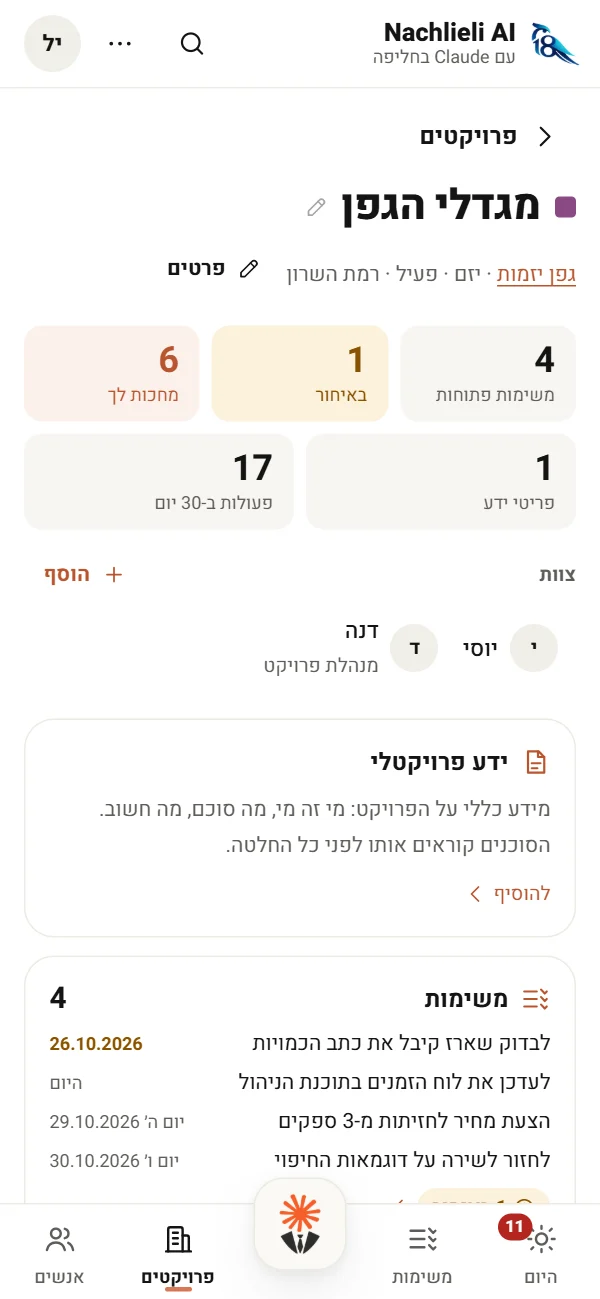
    Screenshots of the team site itself, with sample data. On phone and computer, in Hebrew, in your organization's name and logo.

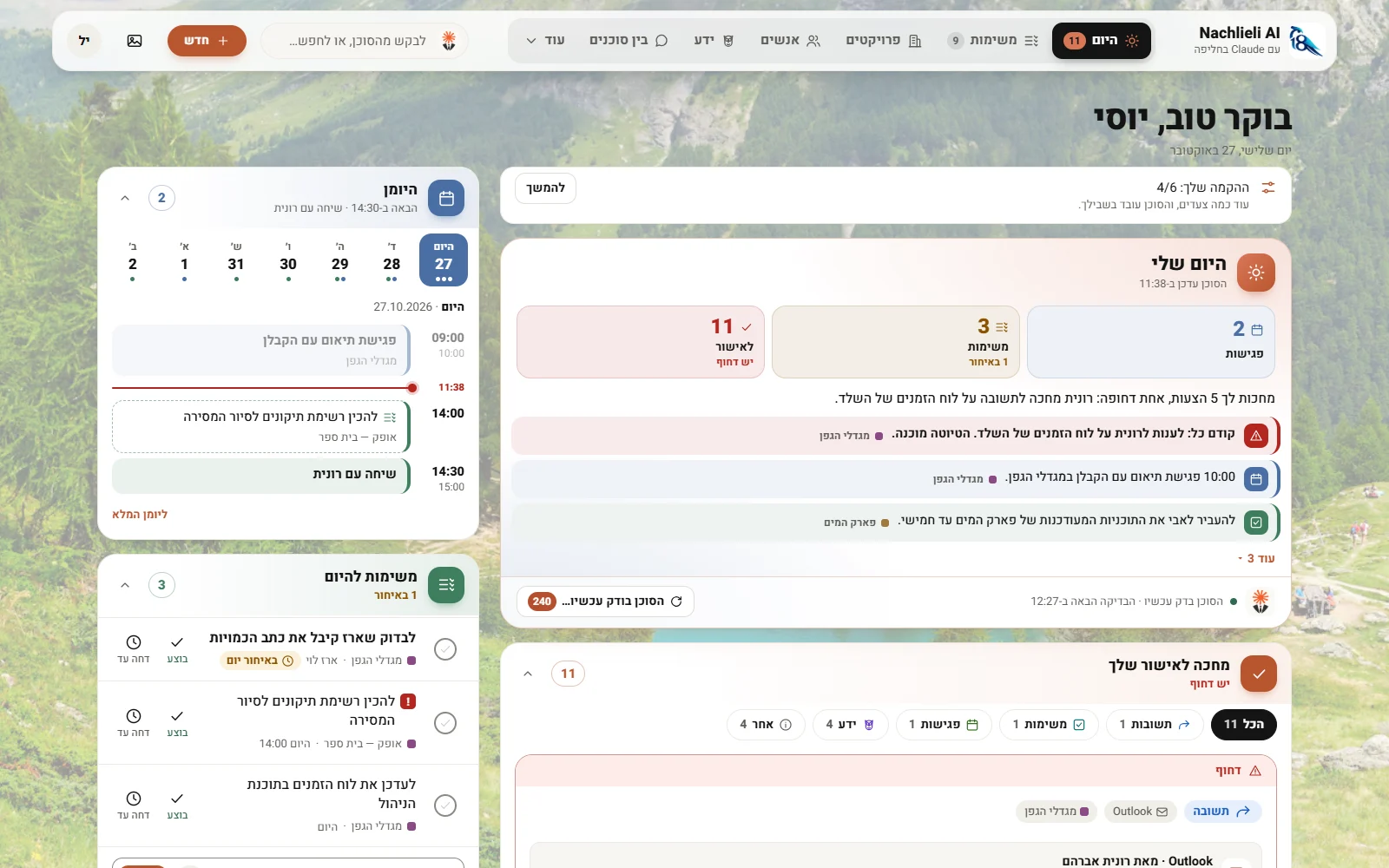
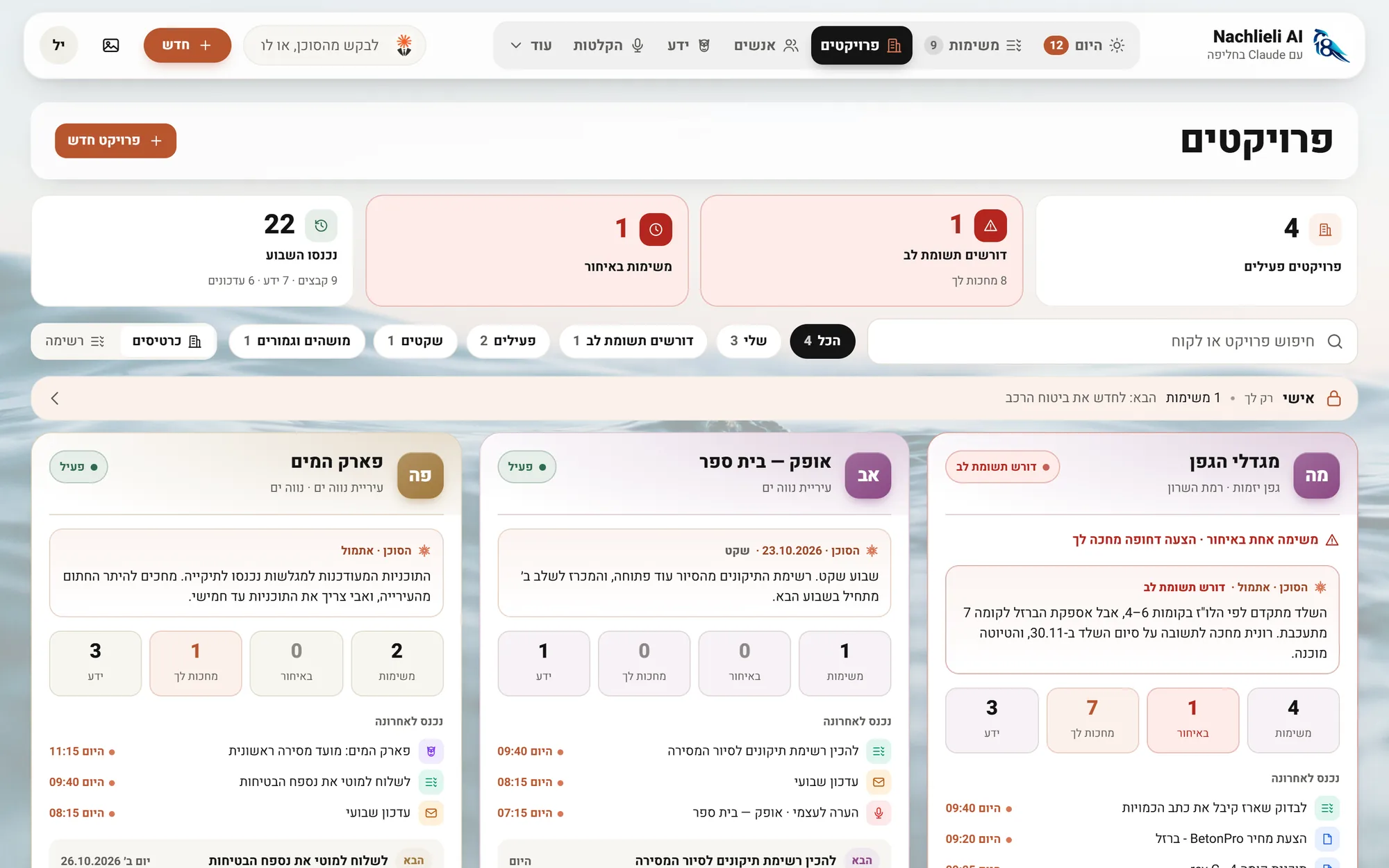
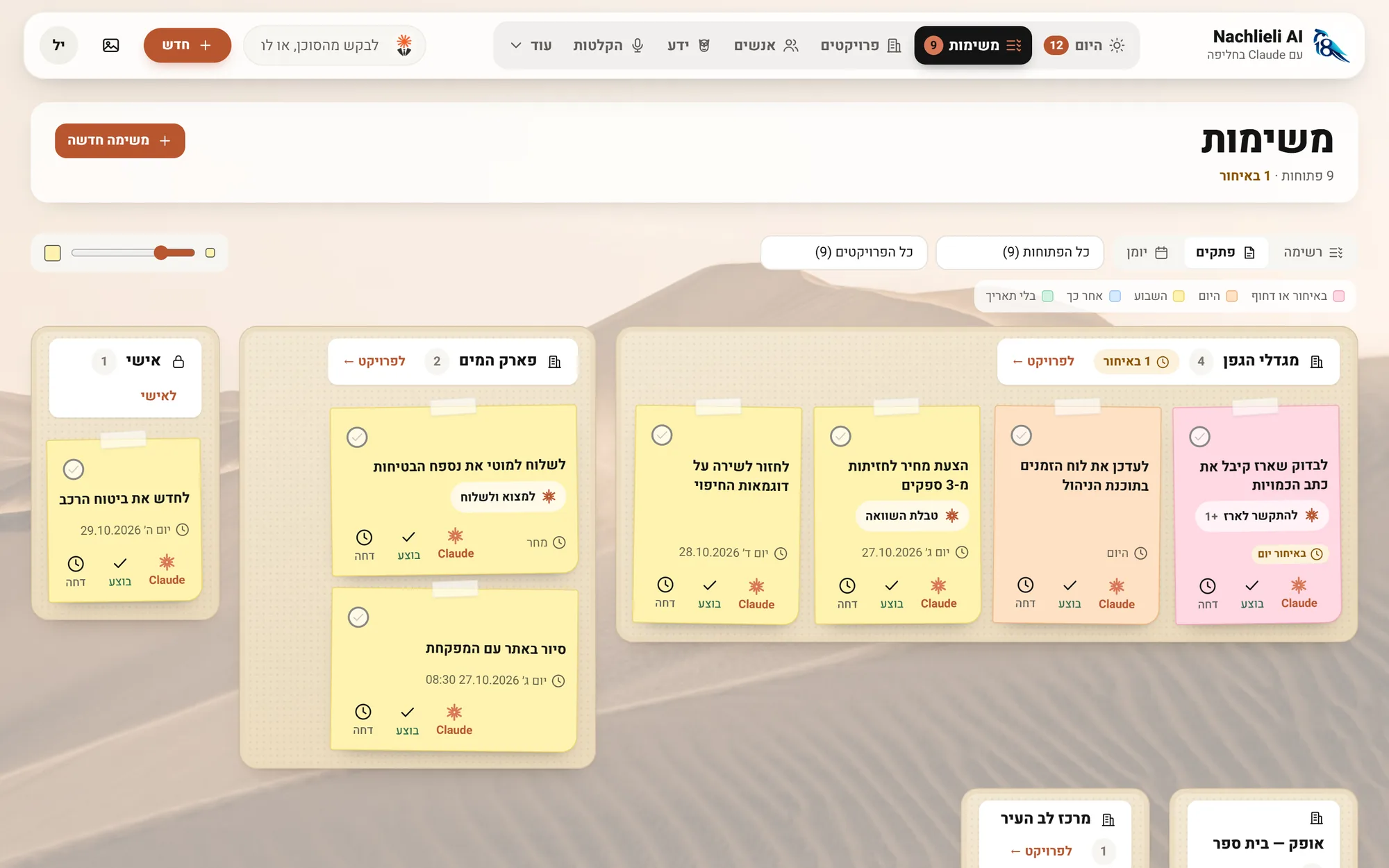
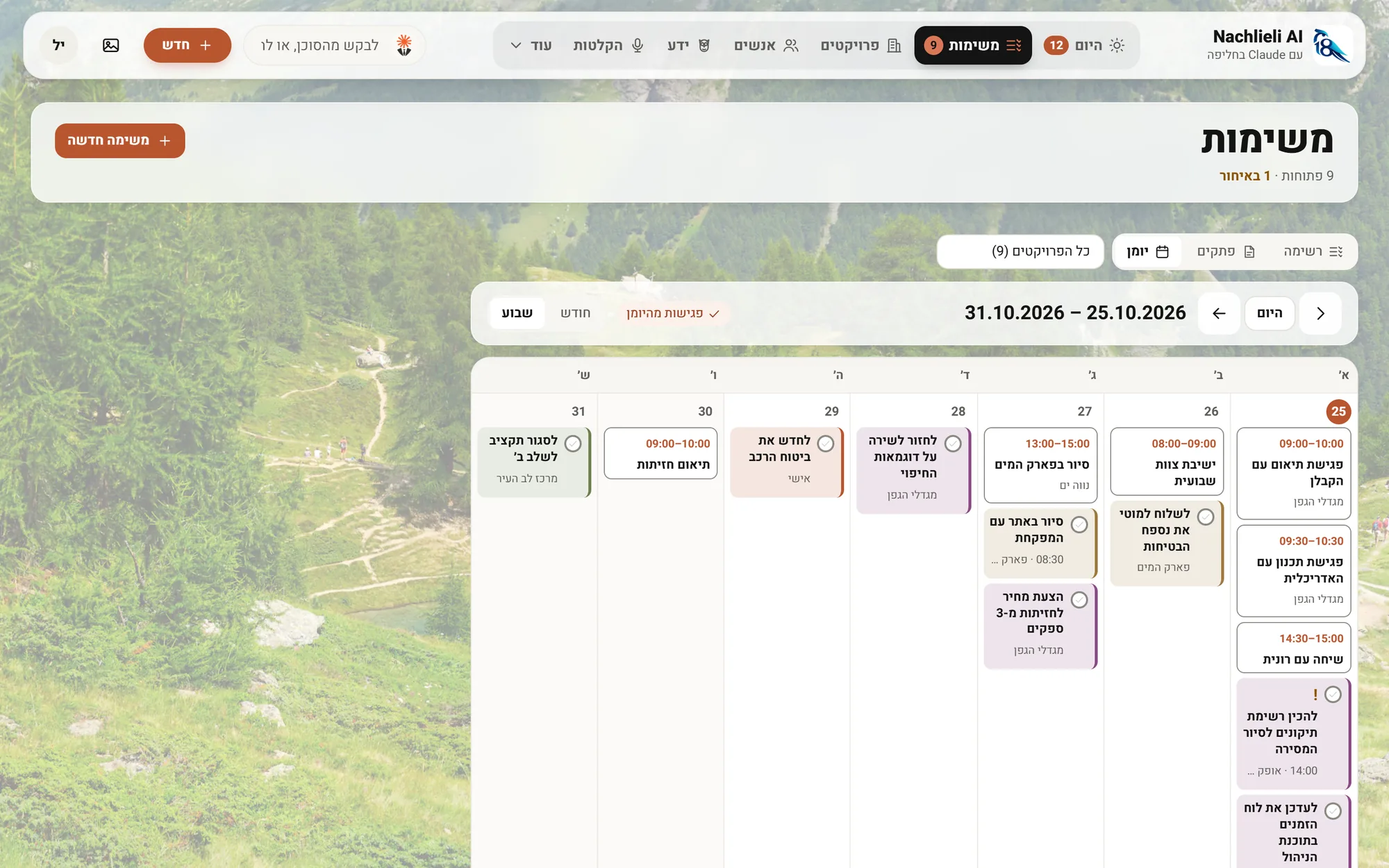
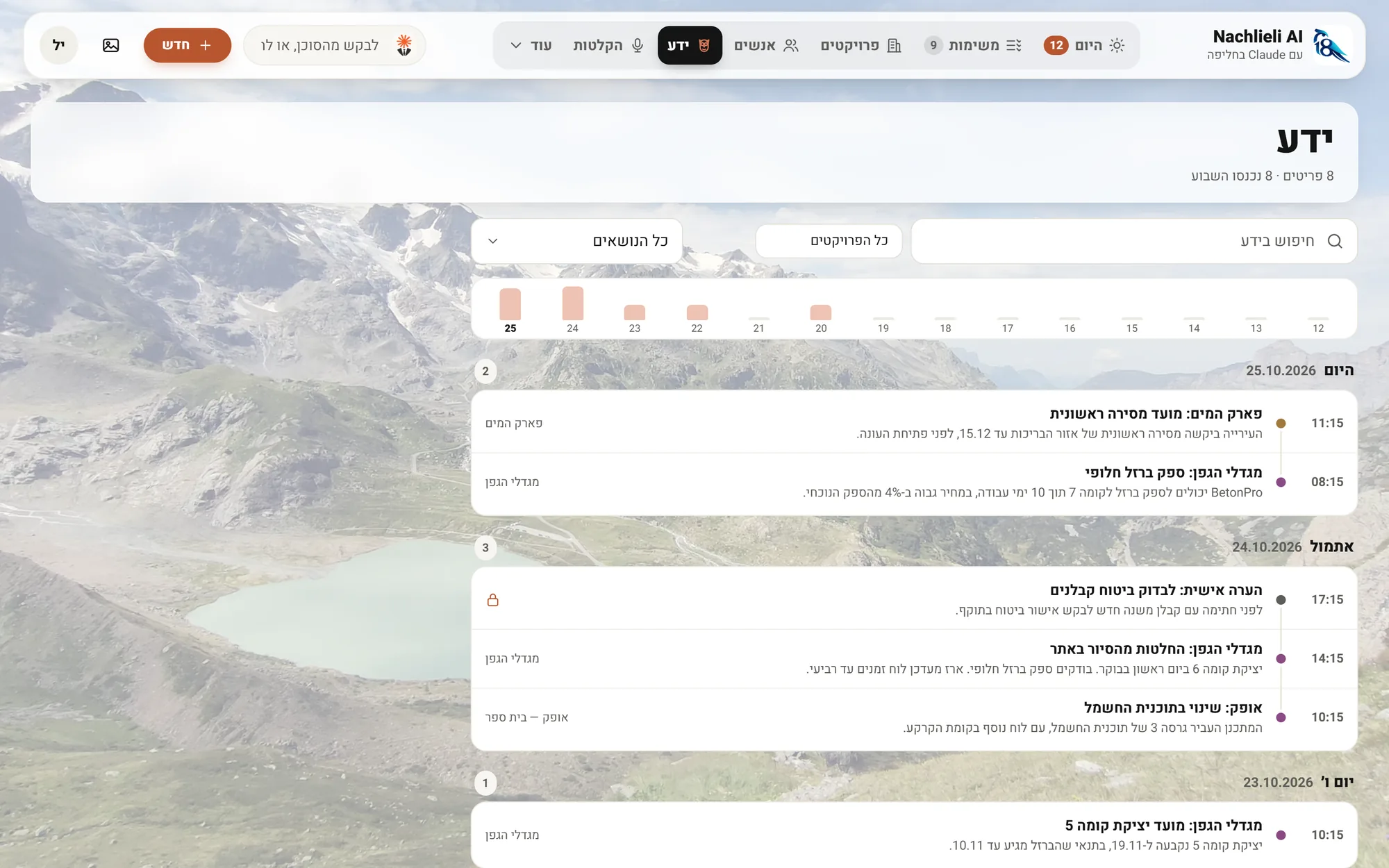
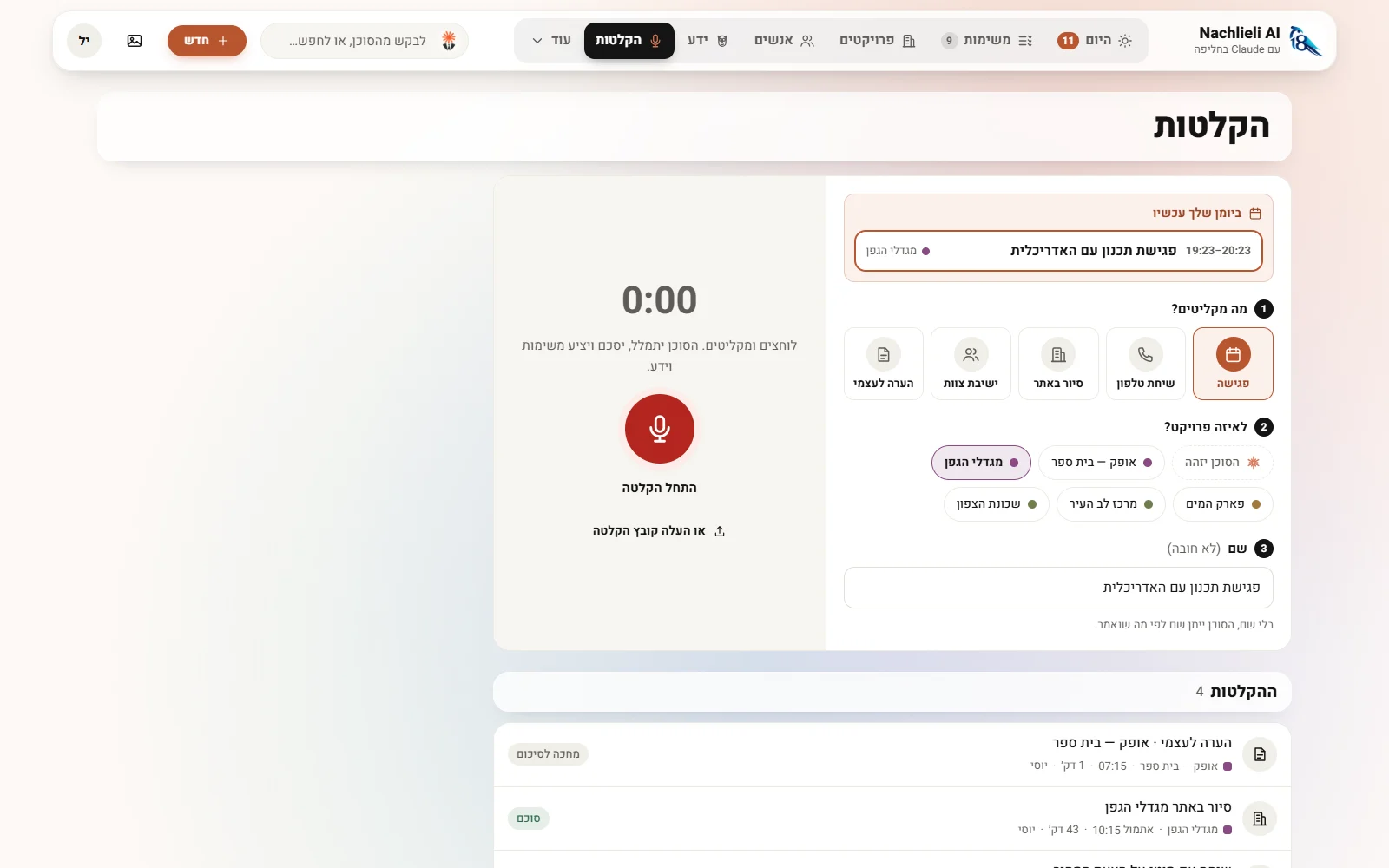
    The Today screen on a computerThe projects screen on a computerTasks as sticky notesTasks and meetings in a weekly calendarThe knowledge of every project, by dayRecording a meeting on a computer

    The day's board, the calendar, what is waiting for approval and what the team is doing, on one screen.Every project as a dashboard: what needs attention, tasks, client and activity.Tasks as colorful sticky notes, each showing the next step Claude recommends.Tasks and meetings from all your calendars, in one week.Everything the business knows, by day: what was learned, in which project and from which source. Claude answers from it in conversation.Recording: what you record and for which project, and the meeting in your calendar right now in one tap.

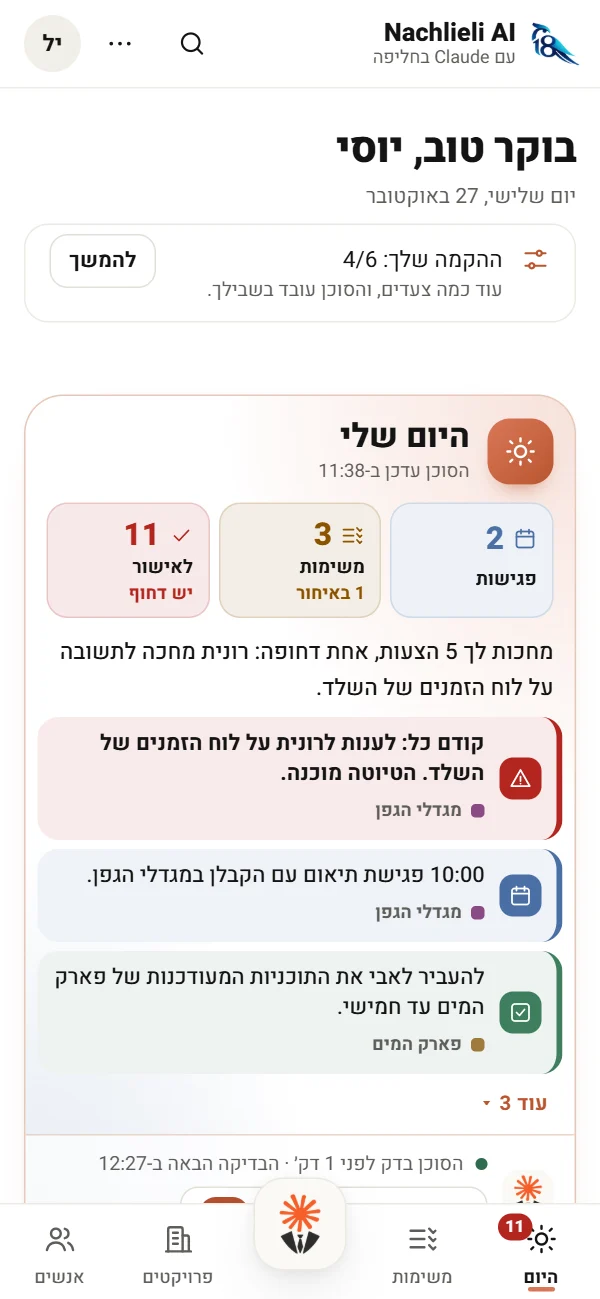
    The Today screen on a phone
    TodayYour morning on the phone: what is waiting, what is urgent, and the day's board.
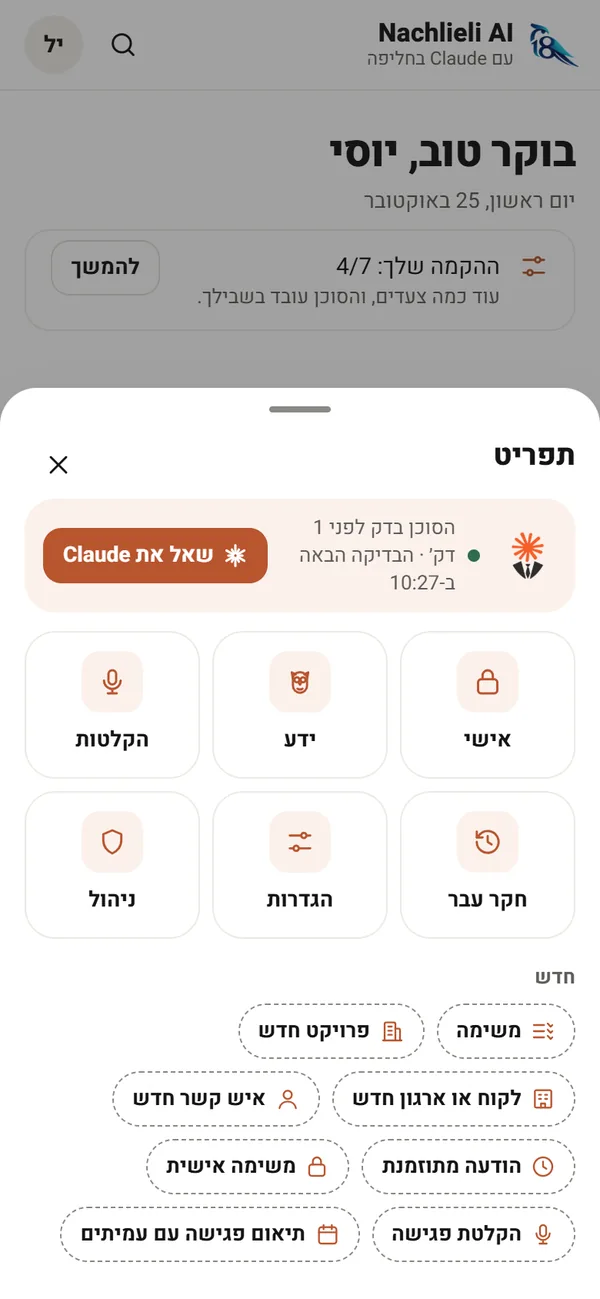
    The agent button's menu on a phone
    Your agentOne button in the middle: ask Claude, reach the knowledge, the recordings and the research of the past, or add a task, a project or a contact.
    A project screen on a phone
    A projectEvery project at a glance: tasks, what is late, knowledge, team and files.

    The data in the screenshots is sample data only. The app itself is in Hebrew.

    FEATURES

    And a few things that make the difference

    SECURE, SELECTIVE WHATSAPP

    Your WhatsApp, finally connected to Claude

    Only the work chats you choose reach Claude: it proposes tasks and knowledge from them, and sends messages for you when you ask. No outside providers: the phone links to the company's server like WhatsApp Web, and everything is encrypted and stays in-house, under the company's roof. Only the chats you choose to follow are kept, for 30 days. Any other chat is read only when you ask, and nothing of it is kept.

    CONTACTS

    One address book for the project and the company

    Contacts are gathered on their own from every user's email and WhatsApp, and kept together in the project's and the company's address book. The same person's email and phone join one card, and when in doubt, one question: "Same person?".

    DIGITAL SIGNING

    A quote goes out for signature, and comes back signed

    Tell Claude "prepare Danny a quote and send it to him for signature", or send it from the app. The company's template is filled with the client's and the project's details from the system, and the totals and VAT are computed in code. Once you approve, a personal signing link goes out, limited in time, on WhatsApp from your number or by email.

    The client signs on the phone, with a finger or by typing, with nothing to install. Every step is logged: time, IP address and device. The signed document gets a confirmation page and a digital fingerprint, is saved in the project's folder and sent to the client. No subscription and no fee per document.

    AUTOMATIONS

    Messages that go out on their own, on time

    Tell Claude "every Sunday at 8, remind the team to send the report", and it goes out on time from your own WhatsApp. A report from a business system too: every evening, or only when something is wrong.

    PROCESSES

    What has to happen, in what order, and who does it

    A permit, a tender, a construction stage or a document that goes through signatures: every step with an owner and a date. When a step is done, whoever has the next one gets a task. When Claude sees in email or WhatsApp that a step happened, the project lead gets a request to approve it. And you can simply dictate the steps to Claude.

    SCHEDULE

    The project's Gantt, and Claude knows it

    Upload the schedule from MS Project or Primavera, even from email, Drive or WhatsApp. The project page shows what is late, the milestones and what moved since the last version, and Claude writes in the project's good morning what is coming up and what is late.

    QUIET

    Few notifications, only when urgent

    A phone notification only when the agent finds something urgent. Everything else waits in one place, and "Nothing to approve right now" is a good state.

    MONITORING

    Every check reports what it checked

    At the end of every check the agent tells the server what it checked in each channel and what it found. A channel that fails twice in a row, or was not checked at all, shows up as an alert on the screen and the phone. No false quiet.

    IN CONVERSATION

    Claude runs the system for you

    "Open a project for a new client, with a Drive folder, and add Dana to the team": Claude does it through the server's tools, within the rules. Deleting goes to a bin, and can be restored.

    LEARNS FROM YOU

    Everyone teaches the agent

    Declining with a reason teaches it what not to suggest again, and a standing instruction like "from now on, skip emails from the bank" holds for every check after.

    DICTATION

    Speak instead of typing

    A microphone in every field of the app. Hold and speak, in Hebrew or English, and the words are written as you talk.

    YOUR BRAND

    In your organization's name and logo

    The app carries your name and logo, next to Claude in a Suit. It installs on phone and computer like an app, and updates itself.

    CONTROL

    See how much of the plan was used

    The site shows how much of every employee's Claude plan was used, in the 5-hour window and the week. And when it is needed now, "Update Claude" wakes the agent with a tap.

    DATA SECURITY AND CONTROL

    The same protection as Copilot

    Claude works on its business plan (Team), under a direct contract with Anthropic: your data is not used for training and is not shared. These are the same commitments organizations get with Microsoft Copilot, which itself now runs Anthropic's models. And what must be right every time is written in code, on the server.

    Claude Team plan vs. Microsoft 365 Copilot · the commitments on your data
    TopicClaude Team planMicrosoft 365 Copilot
    Your data used for trainingNoNo
    Data processing agreementWith AnthropicWith Microsoft
    EncryptionIn transit and at restIn transit and at rest
    Security certificationsSOC 2 Type II, ISO 27001, ISO 42001ISO 27001, SOC 2
    Who processes the data, when working with ClaudeAnthropic, directlyAnthropic, as Microsoft's subprocessor

    Business plan only: a personal Claude subscription (Pro) is a consumer product, like Copilot Pro. Meeting recordings are transcribed by Soniox, and the audio is deleted there right after.

    The server enforces, Claude decides

    The server runs no AI. Permissions, approvals and limits are written in code, regardless of what the prompt says.

    Nothing goes out without approval

    An email is sent, or kept as a draft, only after you approve. The same for a WhatsApp message, a calendar meeting and a document for signature.

    No knowledge comes in without approval

    Claude only suggests what to keep, and nothing from an employee's channels enters the knowledge on its own. A knowledge item goes in after the employee approves it, and they choose: the whole team, or only me. Tasks and knowledge marked "only me" stay with the employee and their agent.

    Your data stays with you

    The database, WhatsApp and file folders sit in the organization's own accounts: in the cloud you choose, or on a computer in your office.

    Encryption

    Messages, transcripts, keys and connections are stored encrypted.

    Everything is reversible

    Decisions can be undone, and deleting goes to a trash bin first.

    What is stored, where, and who sees it · the email itself stays in the mailbox
    WhatWhat exactly is storedWho sees it
    Projects and organizationsStatus, people, Drive folder, tasks, knowledge, recordings, deliverables and activity trendThe whole team
    PeopleName, role, emails, phones, the organization's domain, and a link to the phone contactThe whole team
    TasksTask, commitment or follow-up, whose, by when, and where it came fromThe team, or personal
    KnowledgeThe item, the project, the source (email, meeting, file), who approved it and whenThe whole team, or only me
    Proposals and decisionsWhat was proposed, what was decided and why, with undoEach employee, their own
    Activity logWho did what and when. From emails only identifiers are stored, never the contentThe whole team
    WhatsAppOnly chats you chose to follow: encrypted, 30 days, then deleted. Of any other chat no content is stored, only each message's id and time, for a weekThe number's owner and their agent
    RecordingsThe transcript and summary, encrypted. The audio is deleted after transcriptionThe project
    Documents for signatureThe document, the signatures and a log of every step: time, IP address and device. Encrypted, and never changed. A signed copy in the project's folder. A signer sees only their own documentThe whole team
    FilesInside the organization's Google Drive. The server holds only the connectionBy the Drive permissions

    PRICING

    What it costs

    A one-time price for the system and its setup, quoted separately. After that, only small monthly costs, with no per-user license. And it all runs with you.

    One-time

    The system and its setup

    Setup, fitting it to your organization and connecting the channels, at a one-time price quoted separately.

    After that, every month:

    $36/month

    The infrastructure, for the whole organization

    One server and a database, in the organization's account. No matter how many employees.

    $20/employee/month

    Each employee's Claude subscription

    All the AI work is inside it: the hourly checks, research into the past, conversations, reports. The site shows how much of the plan was used.

    As needed

    When you need more

    Upgrade the plan only for those who need it. Meeting transcription: a small pay-per-use fee.

    With you, fully on premise. The server and the database, the data, the Claude accounts and the API keys: all in the organization's name, and running with you.
    What you don't pay for:a CRM license per useran outside WhatsApp gatewayan AI model on the servera digital signing subscription

    Prices are illustrative, based on the providers' price lists in October 2026, and may change. The one-time price is quoted separately.

    GETTING STARTED

    From setup to work in a week

    1. 1

      Set up the server

      A server and database in the organization's account, connected to Drive and WhatsApp.

    2. 2

      Connect the team

      A user on the site, Claude with a personal address, and "My setup" checks that everything works.

    3. 3

      Research the past

      In the first nights the agent learns the history and proposes the map and the knowledge.

    4. 4

      We train every employee

      Training for the whole team: what Claude can do on its own, what it does once connected to the company's systems, and how to work with the companion app, on desktop and phone.

    5. 5

      Work from the phone

      Your morning, what's waiting for you, one-tap approval, and voice.

    LET'S TALK

    Ready to buy your Claude a new suit?

    A short call, and together we'll work out what the agent will do for you: which mailboxes, which groups, and what the team needs to see every morning.

    Works for teams that don't use Claude yet, too. It is very easy to learn.

    Or leave your details, and I'll get back to you

    Or by email: noam@nachlieli.ai